Online Customs Verification (Verification of Items Taken Out of Japan Upon Departure) Frequently Asked Questions
Contents
 User Registration
 Wi-Fi Connection
 Record of Purchase
 Departure Procedures
 Procedure History
 Show Results
 Errors
 Other
Other
User Registration
Q1-1: Please explain how to register user information.
A. To complete online customs verification (verification of items taken out of Japan upon departure), you must create an account on Visit Japan Web (external site) and register the following information about the user.
- Passport and other related Information
- Information on the Landing Permit Stamp
For more details, please visit Visit Japan Web (external site).
Wi-Fi Connection
- Q2-1: Please tell me which airports are available.
- Q2-2: Which area of the airport should I go to in order to connect to the dedicated Wi-Fi network?
- Q2-3: What is the SSID of the dedicated Wi-Fi network I should connect to?
- Q2-4: Where should I go to complete the procedure at an airport where online customs verification is unavailable?
- Q2-5: Please explain the steps for connecting to Wi-Fi.
Q2-1: Please tell me which airports are available.
A. Online customs verification (verification of items taken out of Japan upon departure) is available at the following airports: For other airports and seaports, please scan your passport at the tax-free procedure terminals located at each airport or seaport.
| Airports Where Online Check-In Is Available | |
|---|---|
| Narita International Airport | Haneda (Tokyo International) Airport |
| Kansai International Airport | Chubu International Airport |
| New Chitose Airport | Fukuoka Airport |
| Naha Airport | |
Please refer to “Q8-4” for information on terminal locations at each airport and seaport.
Q2-2: Which area of the airport should I go to in order to connect to the dedicated Wi-Fi network?
A. For information on Wi-Fi coverage areas at each airport, please check the Customs website (external site).
Q2-3: What is the SSID of the dedicated Wi-Fi network I should connect to?
A. Please check the Customs website (external site) for the SSIDs of the dedicated Wi-Fi networks at each airport.
Q2-4: Where should I go to complete the procedure at an airport where online customs verification is unavailable?
A. For airports and seaports where online customs verification (verification of items taken out of Japan upon departure) is not available, please scan your passport using the tax-free procedure terminals installed at each airport or seaport. Please refer to “Q8-4” for information on terminal locations at each airport and seaport.
Q2-5: Please explain the steps for connecting to Wi-Fi.
A. Since the steps for connecting to Wi-Fi vary depending on the smartphone you are using, please check the official websites of the respective smartphone manufacturers for details.
Record of Purchase
- Q3-1: Please explain how to view the screen displaying the Record of Purchase.
- Q3-2: How long my Record of Purchase be displayed?
- Q3-3: There is an error in the Record of Purchase shown.
- Q3-4: I made a purchase at a tax-free shop, but there is a purchase record that isn't showing up.
- Q3-5: I did not present the Visit Japan Web 2D code when making a purchase at a tax-free shop. Will the purchase record still be displayed if I do not present the 2D barcode?
Q3-1: Please explain how to view the screen displaying the Record of Purchase.
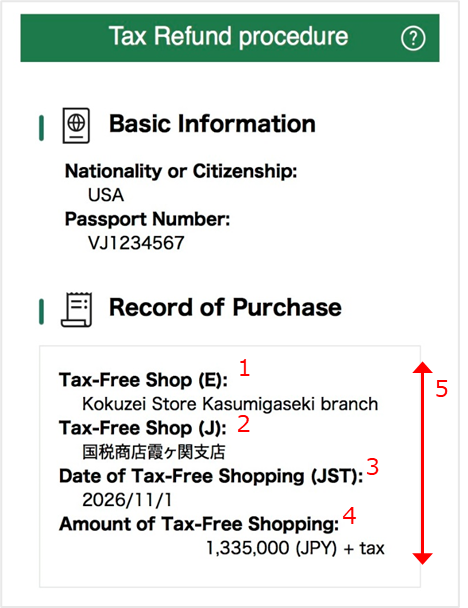
A. The details of the items displayed in the Record of Purchase are as described in the legends below, numbered 1 through 5.
- 1
- Name of the tax-free shop where the purchase was made (in English)
- 2
- Name of the tax-free shop where the purchase was made (in Japanese)
- 3
- Date of Purchase (Japan Time)
- 4
- Purchase amount (excluding tax) (Japanese yen)
- 5
- If the details do not fit on the screen, you can scroll to view them.
Please note that the items will be displayed based on the units linked from the tax-free shop where they were purchased (generally by receipt), rather than by individual product.
Q3-2: How long my Record of Purchase be displayed?
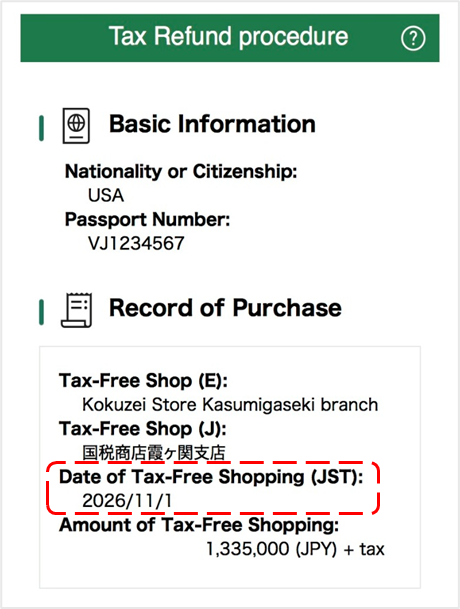
A. It will be displayed under the following conditions.
- Of the Records of Purchase sent by tax-free shops, those from the past 90 days are displayed.
- If you have presented your passport (such as by scanning it at a tax-free procedure terminal or tapping the “Confirm” button), it will not appear on this screen. *
* If you present your passport or perform a similar action, it will appear on the Procedure History screen (the screen that appears after you tap the “History” button). For details on the information displayed on the Procedure History screen, please refer to “Q5-1.”
* Even if, as a result of presenting your passport or similar, there are the Records of Purchase that require customs verification for carrying out from Japan, they may still be displayed on this screen.
Q3-3: There is an error in the Record of Purchase shown.
A. For purchase records, information received from the tax-free shop where the purchase was made will be displayed. If any information is incorrect, please contact the tax-free shop where you made the purchase.
Q3-4: I made a purchase at a tax-free shop, but there is a purchase record that isn't showing up.
A. The purchase records to be displayed are as specified in “Q3-2.”
This information will not appear unless it has been sent by a tax-free shop, so please wait a short while after your purchase or contact the tax-free shop where you made your purchase.
Q3-5: I did not present the Visit Japan Web 2D code when making a purchase at a tax-free shop. Will the purchase record still be displayed if I do not present the 2D barcode?
A. Purchase records from tax-free shops where the Visit Japan Web 2D code was not presented will also be displayed on the screen.
Please also refer to “Q3-2” for details regarding which purchase records will be displayed.
Procedures for Departure
- Q4-1: Please explain how to read the screen.
- Q4-2: Please explain how to refresh the displayed page.
Q4-1: Please explain how to read the screen.
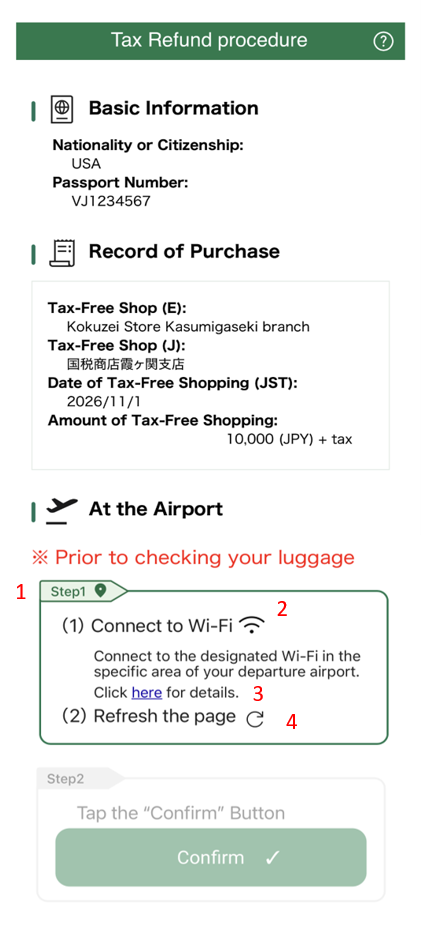
A. The screen displayed for airport procedures changes depending on the user's actions and other factors. Please note that you may be required to confirm that you are taking tax-free items out of Japan at the customs inspection area; therefore, please tap the “Confirm” button before checking your baggage.
(1) If you are not connected to the dedicated Wi-Fi network
- 1
- If you are not connected to the dedicated Wi-Fi network, “Step 1” will be activated.
- 2
- (Translation) Please connect to the designated dedicated Wi-Fi network at the departure airport.
- 3
- Tapping “here” will take you to a page listing the coverage area and SSID for the specified dedicated Wi-Fi network.
- 4
- (Translation) Please update the displayed page information.
(Reference) If you are unsure how to update the displayed page, please refer to “Q4-2.”
(2) If you are already connected to the dedicated Wi-Fi network
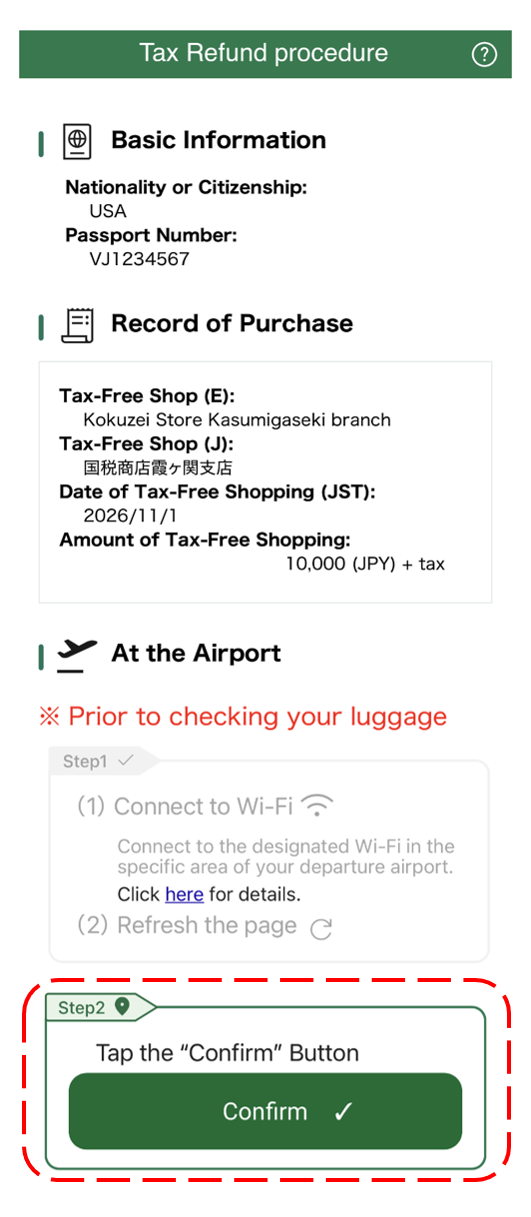
If you are already connected to the dedicated Wi-Fi network, “Step 2” will be activated.
(Translation) Please tap the “Confirm” button.
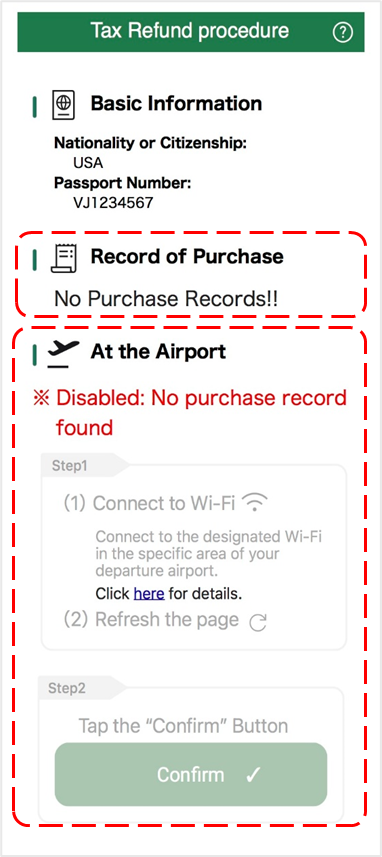
(3) When there are 0 purchase records displayed
If no purchase records are displayed (if “No Purchase Records” is displayed under “Record of Purchase”), you cannot proceed because there are no purchase records eligible for processing.
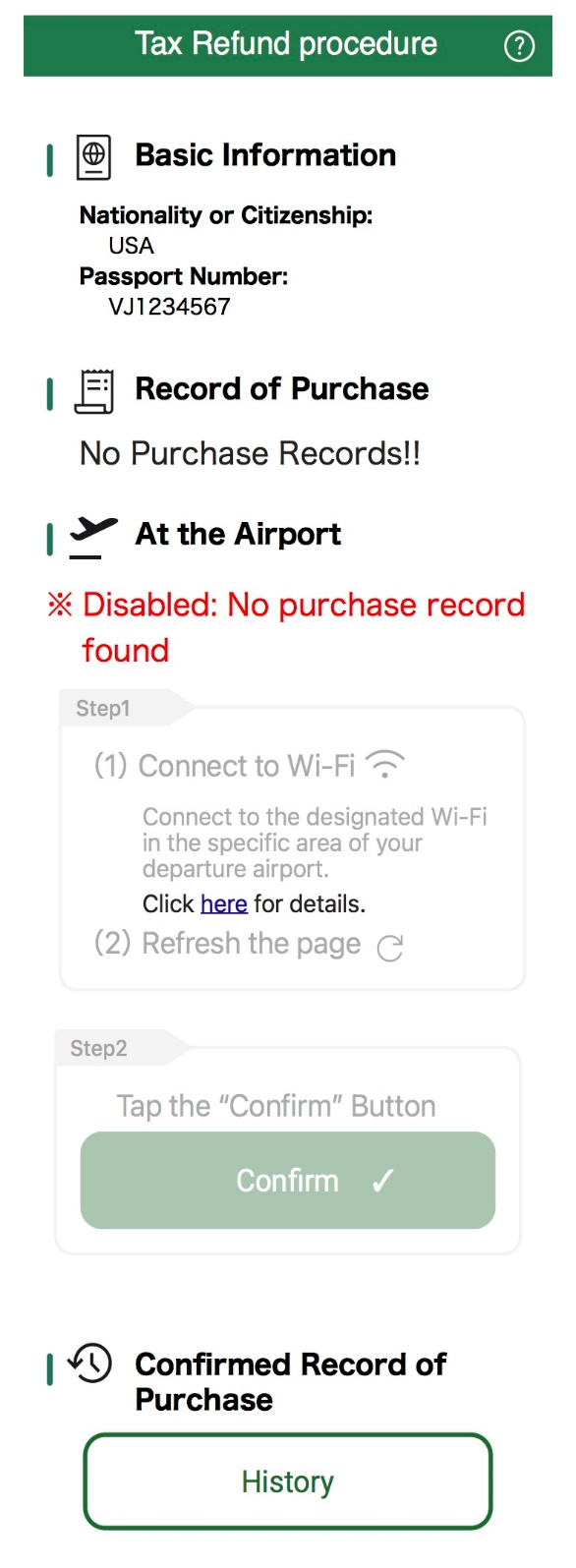
- “※Disabled” (Cannot be executed) is displayed.
- Both “Step 1” and “Step 2” will be deactivated.
(Reference)
Q4-2: Please explain how to refresh the displayed page.
A. The procedure for refreshing the displayed page varies depending on the web browser you are using. Please search the web using keywords such as “how to refresh a browser” or “how to reload a browser” to find instructions for the web browser you are using.
Procedure History
- Q5-1: Please explain what information is displayed in the procedure history.
- Q5-2: Please tell me how long the procedure history is displayed.
Q5-1: Please explain what information is displayed in the procedure history.
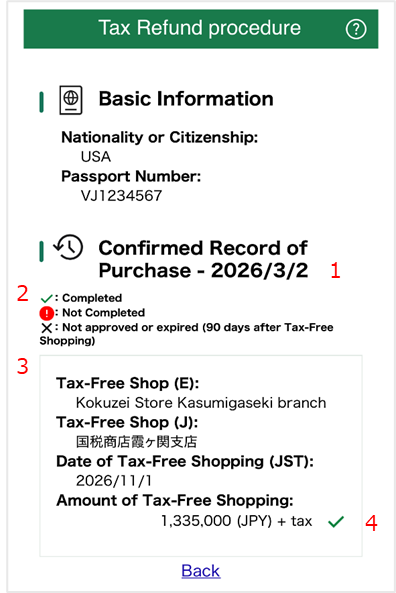
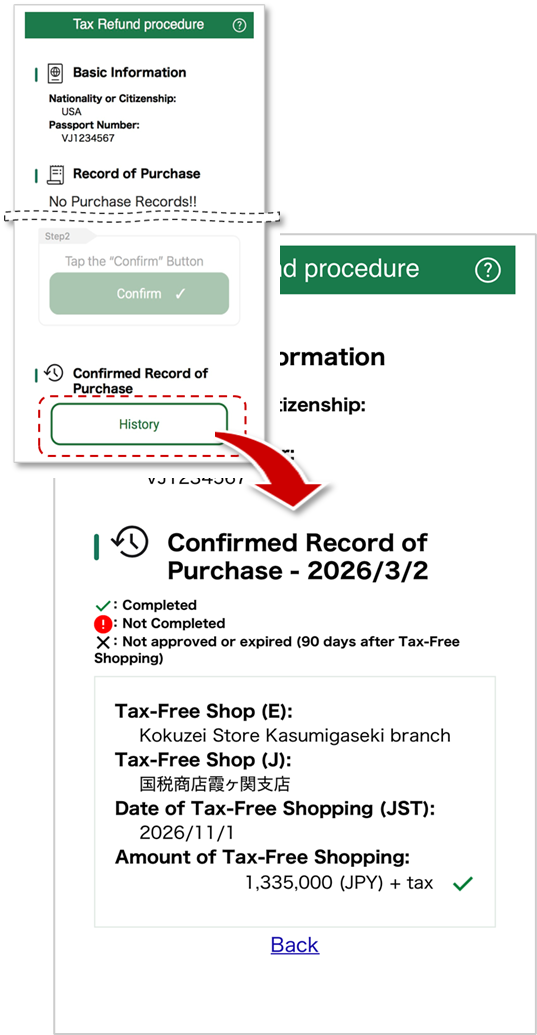
A. The information displayed in the procedure history is as described in the legends 1 through 4 below.
- 1
- The date on which you last presented your passport (such as when your passport was scanned at the tax-free procedure terminal or when you tapped the “Confirm” button) will be displayed.
- 2
-
A legend for the symbols displayed next to the purchase amount in each purchase record. Each symbol indicates the status of the procedure after presenting a passport or similar document, and their meanings are as follows:
- Green checkmark (Completed)
Purchase Records with Customs Verification Complete - Red exclamation mark (Not Completed)
Purchase records requiring customs verification of items taken out of Japan. Once Customs has verified the items taken out of Japan and confirmed that they are in your possession, the status will be updated to “Completed”. If the status does not update to “Completed,” the purchased items will not be eligible for tax exemption (or a tax refund). - Black “X” (Not approved or expired)
Purchase records that were confirmed as “Not in Possession” following a customs exit inspection, or purchase records that were not marked as “Completed” within 90 days of the purchase date. Purchase records marked as “Not approved or expired” are not eligible for tax exemption (or a tax refund).
- Green checkmark (Completed)
- 3
- Purchase records for which a passport was presented (or purchase records that are more than 90 days old) will be displayed. The procedure for viewing purchase records is the same as described in “Q3-1.”
Please note that even if, as a result of presenting your passport, etc., there are purchase records that require customs clearance for taking out of Japan, they may still be displayed on the Record of Purchase screen “Q3-2”. - 4
- The processing status of purchase records for which a passport was presented (or purchase records that are more than 90 days old) will be indicated by the symbols listed in 2.
Q5-2: Please tell me how long the procedure history is displayed.
A. The procedure history for each purchase will be displayed for approximately 6 weeks after you present your passport (e.g., by scanning it at the tax-free procedure terminal or tapping the “Confirm” button). (After then, we will delete the data in order.)
Please note that if you have exceeded your period of stay or have deleted your account on Visit Japan Web (external site), you will not be able to proceed to the screen displaying your procedure history; therefore, you will not be able to view your procedure history regardless of the number of days that have passed.
Show Results
- Q6-1: Please explain how to read the screen showing the results of the procedure.
- Q6-2: Where is the customs inspection area?
- Q6-3: I accidentally closed the window. Is there a way to check the results again?
- Q6-4: “Not Completed” was displayed. Do I have to go to the customs inspection area?
- Q6-5: “Completed” was displayed. Where can I check the status of my refund?
Q6-1: Please explain how to read the screen showing the results of the procedure.
A. The information displayed varies depending on whether a customs inspection is required. The details displayed for each are as follows.
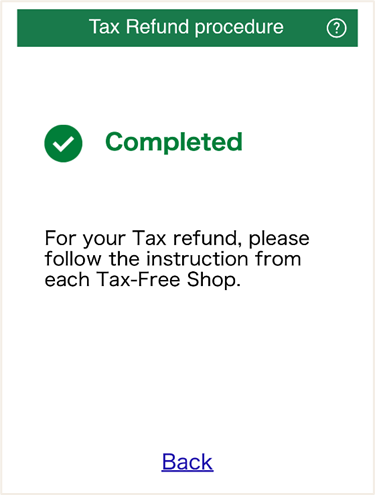
(1) “Completed” (Procedure completed)
- The customs verification procedure (verification of items taken out of Japan) is now complete.
- For refunds, please follow the instructions provided by the tax-free shop at the time of purchase and proceed with the necessary procedures as needed.
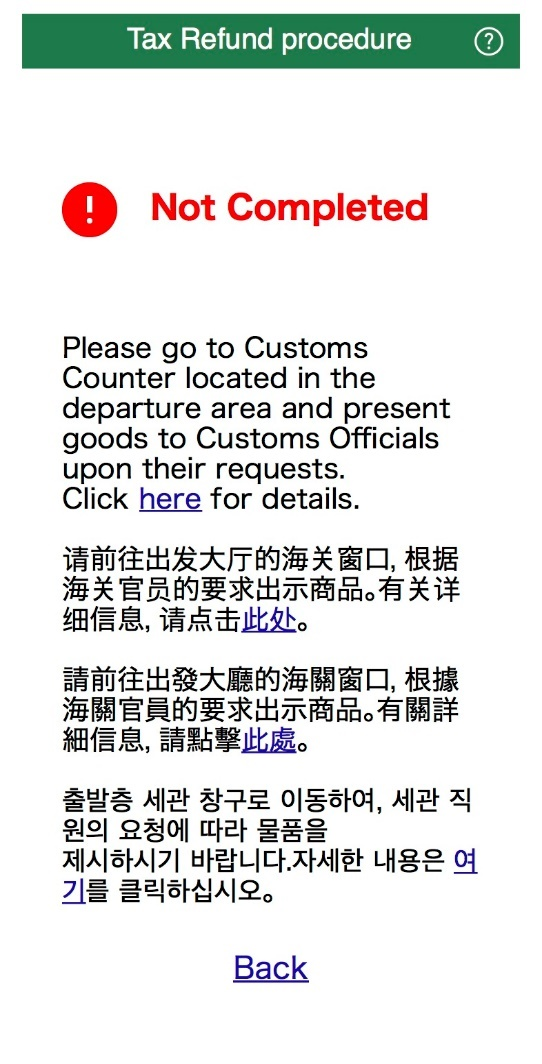
(2) “Not Completed” (Requires customs inspection)
- Please proceed to the customs inspection area and present your items as requested by the staff.
- You can find detailed information about customs inspection areas and other details on the page accessible via the “here” link.
Q6-2: Where is the customs inspection area?
A. Please check the Japan Customs website (external website) for the location of the customs inspection area. You can also navigate to the same page by clicking the link on the “Q6-1” screen.
Q6-3: I accidentally closed the window. Is there a way to check the results again?
A. Although you cannot redisplay the same screen, you can click the “History” button at the bottom of the screen where you performed the procedure to navigate to a screen displaying the procedure history for each purchase record. For details on what is displayed on the screen, please refer to “Q5-1.”
Q6-4: “Not Completed” was displayed. Do I have to go to the customs inspection area?
A. It is optional whether to have the items inspected by customs upon taking out of Japan.
Please note, however, that if you do not have your tax-free items verified at the customs inspection area, they will not be eligible for tax-free treatment (or a tax refund).
For information on customs inspection areas, please refer to “Q6-2.”
Q6-5: “Completed” was displayed. Where can I check the status of my refund?
A. For tax refunds, please contact the tax-free shop where you made your purchase (or the contact point provided to you at the time of purchase, if applicable).
Errors
- Q7-1 An error screen appeared with the message: “Your passport information could not be verified.”
- Q7-2 An error screen appeared with the message “Currently unavailable.”
- Q7-3 The message “Disabled: No purchase record found” appears, and I cannot proceed with the process.
- Q7-4 The error message “Error, please check it” appeared.
- Q7-5 The error messages “Error, please try again” and “Your Wi-Fi connection was lost.” appeared.
- Q7-6 The error messages “Error, please try again” and “The record of purchases that was been updated.” were displayed.
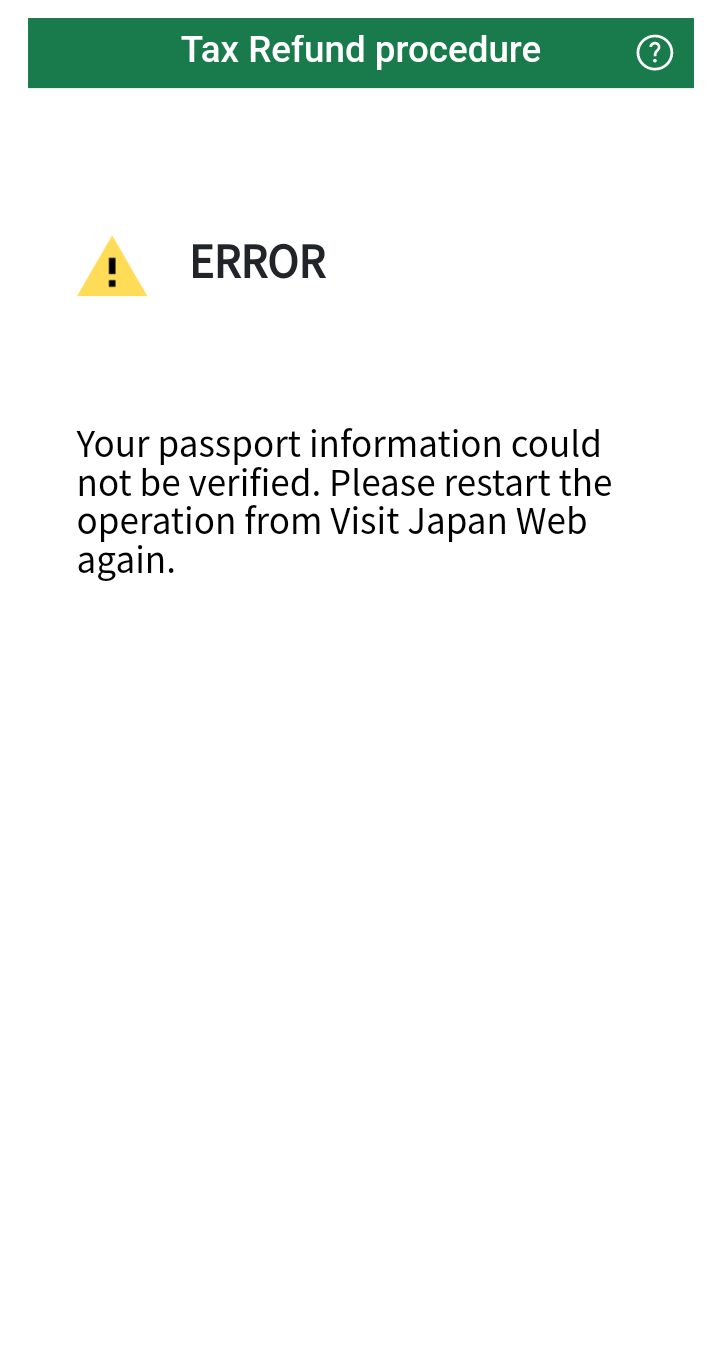
Q7-1 An error screen appeared with the message: “Your passport information could not be verified.”
A. This message is expected to appear when a certain amount of time has elapsed since login.
Please log in to Visit Japan Web (external site) and try the procedure again.
If the same message appears even after you try the procedure again, please scan your passport at the tax-free procedure terminal or wait a short while and try again.
Please refer to “Q8-4” for the locations of the tax-free procedure terminals.
(Reference) Image of the error screen
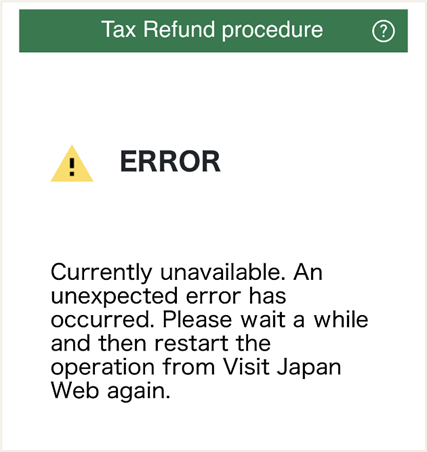
Q7-2 An error screen appeared with the message “Currently unavailable.”
A. This message may appear in situations such as a temporary interruption in communication or when the system is unable to retrieve the purchase record data to be displayed.
Please log in to Visit Japan Web (external site) and try the procedure again.
If the same message appears even after you try the procedure again, please scan your passport at the tax-free procedure terminal or wait a short while and try again.
Please refer to “Q8-4” for the locations of the tax-free procedure terminals.
(Reference) Image of the error screen
Q7-3 The message “Disabled: No purchase record found” appears, and I cannot proceed with the process.
A. This message appears when there are no purchase records subject to this procedure. Please review the following.
- If you present your passport (including having it scanned at the tax-free procedure terminal and tapping the “Confirm” button), your purchase records will be displayed on the page that appears when you tap the “History” button. (Q3-2)
- Purchase records for which no procedures have been completed will be displayed for up to 90 days from the purchase date. (Q3-2)
- If none of the above apply, it is possible that this system has not received your purchase record. Refresh the screen (Q4-2), and if your purchase record still does not appear, please contact the tax-free shop where you made the purchase. (Q3-4)
(Reference) Screen Shot
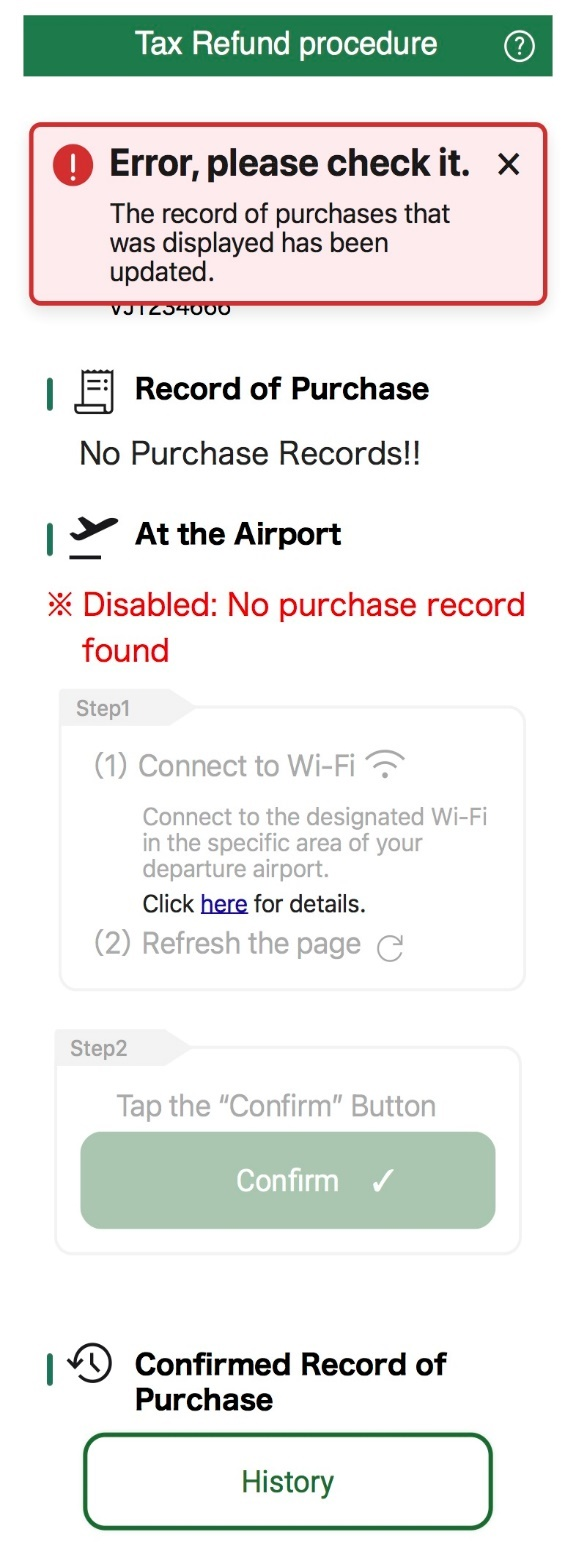
Q7-4 The error message “Error, please check it” appeared.
A. This message may appear if cancellation information for a purchase record is received before the “Confirm” button is tapped. The tax-free shop where you made your purchase may be correcting your purchase record. Until the correction is made, please refresh the displayed page periodically or contact the tax-free shop where you made your purchase.
Please refer to “Q4-2” for information on how to refresh the displayed page.
(Reference) Image of the error screen
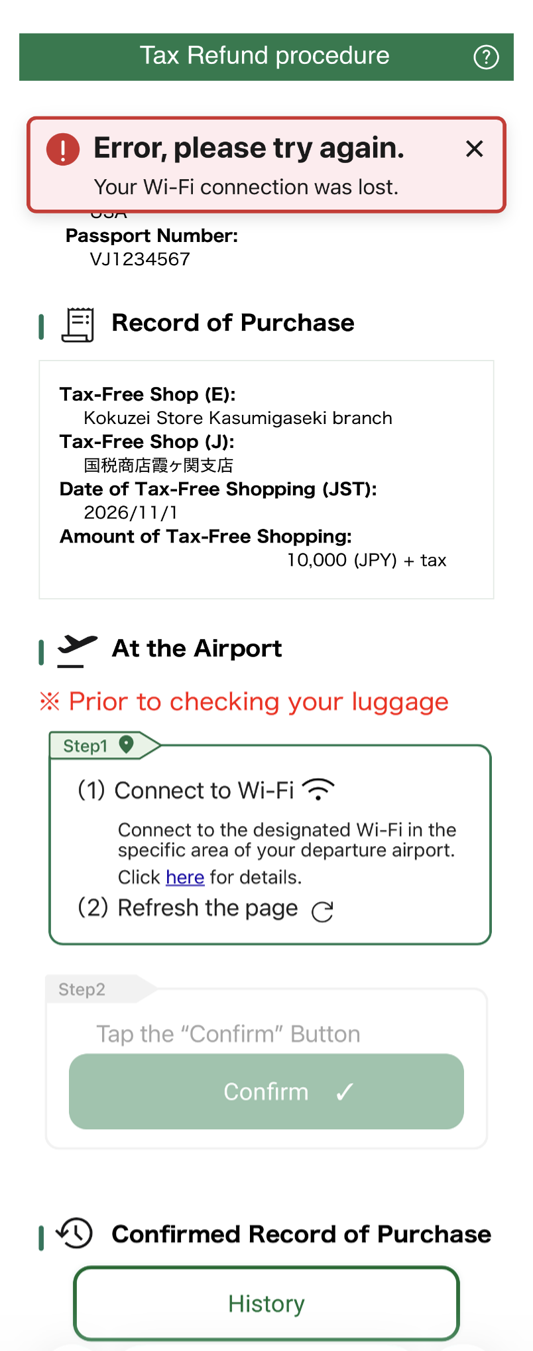
Q7-5 The error messages “Error, please try again” and “Your Wi-Fi connection was lost.” appeared.
A. This message is likely to appear if your connection to the dedicated Wi-Fi is lost—for example, when you leave the dedicated Wi-Fi coverage area before tapping the “Confirm” button.
Please connect to the dedicated Wi-Fi network again and tap the “Confirm” button.
For information on the Wi-Fi SSIDs at each airport, please check the Customs website (external site).
If the same message appears even after you try the procedure again, please scan your passport at the tax-free procedure terminal.
Please refer to “Q8-4” for the locations of the tax-free procedure terminals.
(Reference) Image of the error screen
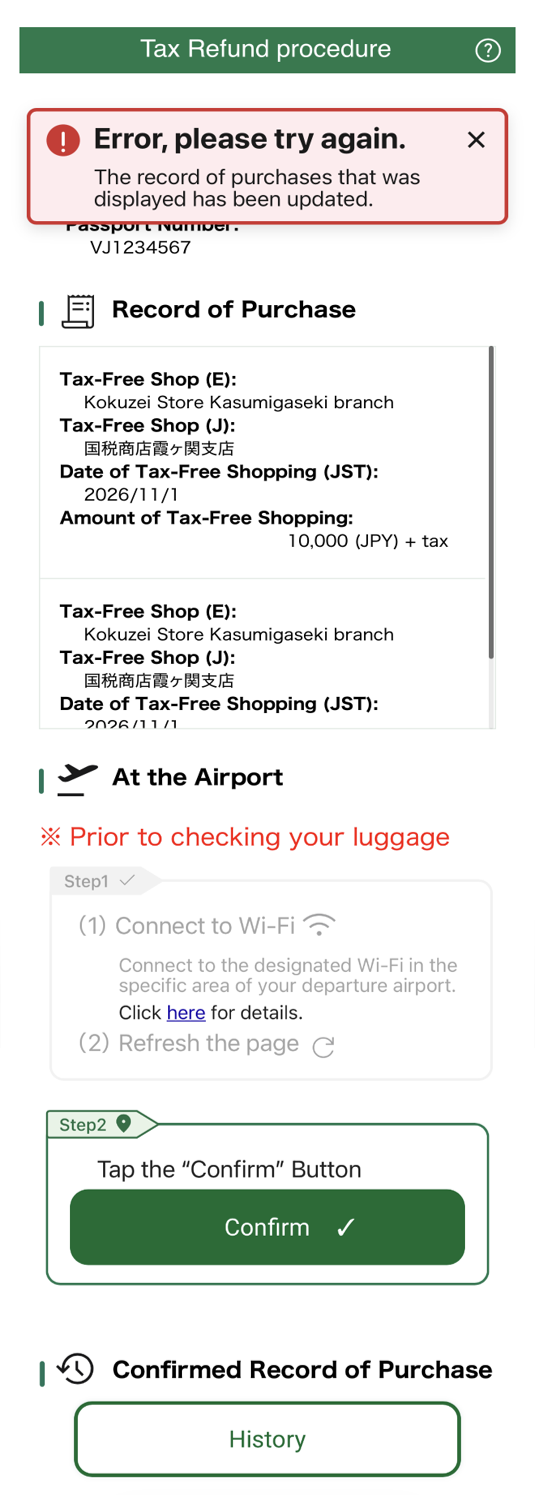
Q7-6 The error messages “Error, please try again” and “The record of purchases that was been updated.” were displayed.
A. This message is likely to appear when, for example, a purchase record is received before you tap the “Confirm” button.
Please review the purchase record displayed and tap the “Confirm” button again.
(Reference) Image of the error screen
Other
- Q8-1 What is the recommended system environment?
- Q8-2: Please tell me about the display language.
- Q8-3: The screen is cut off.
- Q8-4: Is there a way to complete the procedure without going online?
- Q8-5: If I complete the procedure by a method other than online, do I need to register with Visit Japan Web?
- Q8-6: Please tell me who to contact for other questions regarding procedures.
Q8-1 What is the recommended system environment?
A. We recommend using the latest versions of the following web browsers.
- For iOS: Safari, Google Chrome
- For Android: Google Chrome
- For PCs: Google Chrome
Q8-2: Please tell me about the display language.
A. We only support English.
We apologize for the inconvenience, but if you have difficulty using the system, please use the tax-free procedure terminal to scan your passport. Please refer to “Q8-4” for the locations of the tax-free procedure terminals.
Q8-3: The screen is cut off.
A. If the screen is cut off, try turning your smartphone sideways; the display may adjust to fit the screen width.
If you are having difficulty using the system even after switching the display, please use the tax-free processing terminal to scan your passport. Please refer to “Q8-4” for the locations of the tax-free procedure terminals.
Q8-4: Is there a way to complete the procedure without going online?
A. You can also have your passport scanned at the tax-free processing terminals located at each airport and seaport.
For information on terminal locations at each airport and seaport, please visit the Customs website (external site).
Q8-5: If I complete the procedure by a method other than online, do I need to register with Visit Japan Web?
A. If you are completing the procedure through a method other than online, registration with Visit Japan Web (external site) is not required.
Additionally, if you register with Visit Japan Web (external site), you can complete the purchase procedure at tax-free shops by presenting a 2D code on your smartphone or other device instead of showing your passport.
For information on how to complete procedures other than online, please refer to “Q8-4.”
Q8-6: Please tell me who to contact for other questions regarding procedures.
A. Please check the following websites, service counters, etc., depending on the nature of your inquiry.
| Details of Inquiry | Contact Information |
|---|---|
| Information on scanning your passport at the tax-free procedure terminal, dedicated Wi-Fi, and checking procedures of items taken out of Japan at each airport or seaport | Customs inspection areas at each airport and seaport for departing passengers *For information on customs inspection areas, please refer to “Q6-2.” |
| About the Record of Purchase and Refunds Shown | Please contact the tax-free shop where you made your purchase. |
| Registering User Information and Other Information About Visit Japan Web | Please check the Frequently Asked Questions (FAQ) | Visit Japan Web (external site). |
| Other Information on the Tax-Free Shop System | Please visit the Special Page for Travelers (English Version) | Consumption Tax-Free Shop Site (external site). |
Please note that the customs counter cannot answer questions regarding purchase records or tax refunds; please contact the tax-free shop where you made your purchase.
For the location of the customs counter, please refer to “Q6-2.”

